 Super Screen RecorderSuper Screen Recorder
 Vue 9 Infinite
 Tweet Archivist Desktop
 SWiSH Max
 CodeTwo OutlookExport
 TurboCAD MAC Pro
 EasyEDA
 CG Invoicer 3
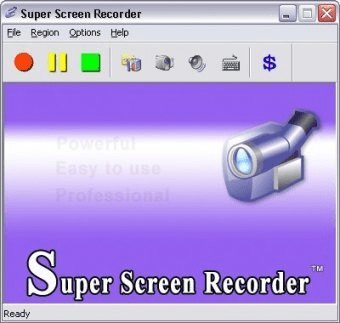
 Super Screen Recorder (SSRecorder.exe). Zeallsoft Super Screen Recorder is a handy screen capture application.
Super Screen Recorder is an intuitive and versatile screen capture tool that allows you to record and take snapshots of your screen effortlessly. Whether you're creating video tutorials, recording gameplay, or capturing software demonstrations, this tool has everything you need. With customizable options and a user-friendly interface, it’s perfect for both beginners and advanced users alike.
This screen recording app offers several modes for your convenience, including full-screen capture, custom rectangle areas, and auto pan features. It also enables you to add your logo watermark to recordings, making it ideal for developers, educators, or content creators. Super Screen Recorder allows you to save your snapshots in JPG or BMP format and record videos in high-quality AVI or WMV formats, with the option to adjust audio and video settings. The app also includes a microphone input for capturing sound from various devices like audio mixers and telephone lines, as well as options to schedule recordings and define hotkeys for easy control.
Managing your recordings has never been easier. With the built-in File Manager, you can quickly access, organize, and share your videos and screenshots. You can delete, send by email, or save your files in custom folders, all while viewing them as a list or thumbnails. Whether you’re making tutorials, documenting software bugs, or recording presentations, Super Screen Recorder is your go-to tool for high-quality screen capture and recording.