AnalogX CaptureAnalogX Capture
 Viper
Viper Bills To Pay
 Game Alarm
 Power CG Plus
 PSP oldTimer 64bit
 CoreAVC Professional Edition
 Sound Cleaner
 AnalogX Capture (CAPTURE.EXE). A quick, small, and simple screen capture utility for Windows.
AnalogX Capture is a streamlined screen capture tool for Windows that offers fast, intuitive, and easy-to-use functionality. Developed by AnalogX, a company renowned for its efficient and minimalistic tools, this application is designed to provide quick and reliable screen captures with minimal hassle. Whether you're capturing your entire desktop or a specific window, AnalogX Capture gets the job done with simplicity and speed.
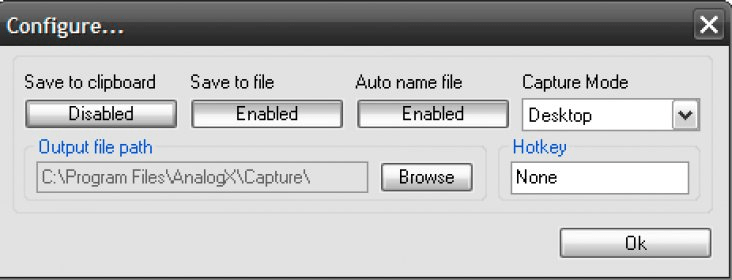
With AnalogX Capture, you can easily capture the full desktop or just the active window. The captured images can be saved as BMP files or copied directly to your clipboard for use in other applications. While the app does not offer a wide selection of formats, it remains a lightweight and efficient choice for quick captures. You can also automate file naming or manually name each screenshot for better organization.
Using the tool is simple: just click on the tray icon or use the right-click menu to take a screenshot. All captures are automatically saved in the application's installation folder. The clean, user-friendly interface and accessible settings make it an excellent tool for those who need no-fuss screen captures. Plus, the included readme file is a helpful resource for new users.