 MonosnapMonosnap
 Professor Teaches Photoshop CS
 BINfinder
 CSV to VCard
 Powerbullet Presenter
 StartMeeting
 2P Label Sense
 NiceLabel Suite
 Monosnap (Monosnap.exe) free download, latest version 5.1.8679.28005, Monosnap is a handy application that allows you to capture screenshots...
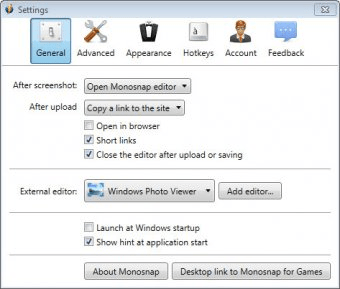
Monosnap is a versatile and easy-to-use tool designed for capturing screenshots, recording desktop activity, and uploading your content online. Whether you're creating tutorials, presentations, or sharing game highlights, Monosnap makes it simple to capture, edit, and share your creations with anyone. It also allows you to record your screen as standalone MP4 videos, making it ideal for crafting engaging tutorials and demonstrations.
The latest version of Monosnap introduces a powerful new feature: "Monosnap for Games." This dedicated tool lets you capture full-screen game scenes with ease. Simply press the F11 key while playing, and you can snap high-quality screenshots of your favorite moments in any game, whether it uses DirectX 9, OpenGL, or newer graphics technologies. This makes it perfect for gamers who want to document their achievements, capture gameplay tips, or share epic in-game moments.
In addition, Monosnap now offers the ability to customize screenshot file names with convenient templates, giving you greater control over how your images are organized. Despite these new features, Monosnap remains a feature-rich yet simple screen capture solution with customizable hotkeys, powerful editing tools, and a variety of uploading options. However, it currently only supports two output formats: PNG and JPEG.
Best of all, Monosnap is completely free, offering a reliable and efficient screen capture experience for anyone in need of an all-in-one tool. Whether you're a content creator, gamer, or just someone who needs to capture and share images and videos quickly, Monosnap is the perfect choice.