 CapturaCaptura
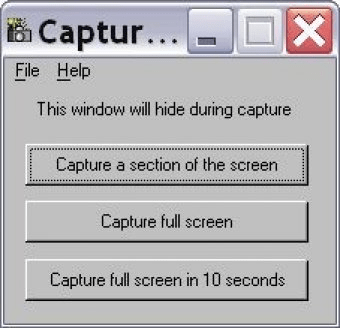
Captura (capnomina.exe). This is a very small but useful application that allows you to capture selected area of your screen or the entire screen.
Fast, lightweight screen capture tool for Windows with precise region selection and a simple workflow
Captura is a compact yet powerful screen capture utility designed for anyone who needs quick, reliable screenshots. Whether you want to grab a selected area or capture the entire display, this lightweight screen capture app keeps the process effortless and distraction-free. It’s ideal for productivity, tutorials, and everyday use—especially if you’re looking for a free screen recorder for PC or a streamlined Windows screenshot tool.
With a clean interface and no unnecessary complexity, Captura minimizes itself when capturing, lets you freely drag to select any region, and supports a timed full-screen capture with a 10-second delay. Just take your shot, save it as a “.jpg,” and you’re done. Designed for simplicity, the app focuses on essential functionality without hotkeys or advanced cursor filtering.
Key Features:
• Capture a selected area or the full screen with one of three easy options.
• Timed full-screen capture with a 10-second delay for hands-free screenshots.
• Drag-and-drop region selection for precise, high-quality JPG output.
• Lightweight design optimized for fast performance and minimal system impact.
• Simple workflow perfect for tutorials, reports, and quick documentation.
 ImpulseStudio
 BSR Screen Recorder
 TransformMovie
 Hercules
 PreSonus Studio One
 Liveistream
 Franz
Franz