Stadium DJ LiveStadium DJ Live
 ContactMonkey Outlook Add-in
 Microsoft Office Outlook
 ShopClock
 drishtipaint
 DX4WIN
 MailRemedy
 QuickBooks Simple Start 2009
 Stadium DJ Live (Stadium DJ Live.exe). No Hassle Screen Setup - Since Stadium DJ creates folders and menus based on your computer's directory structure...
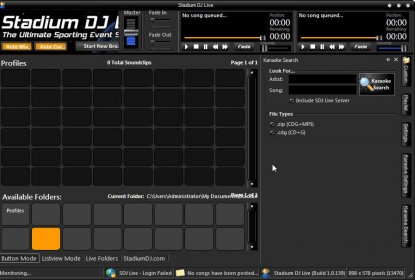
Stadium DJ is the ultimate media player control solution for dynamic, fast-paced environments like sports stadiums, allowing you to independently manage multiple media players. Whether you're handling pre-game hype music, in-game sound effects, or post-game playlists, Stadium DJ ensures you can effortlessly queue and control audio. With its customizable interface and advanced features, it's your all-in-one tool for flawless media management in any setting.
With Stadium DJ, you can run up to three media players simultaneously, with each player functioning independently. Set up is a breeze—simply create folders, add your sound clips, and Stadium DJ organizes everything for you. All your custom sound clips, playlists, and profiles are neatly stored, ensuring smooth transitions and instant access to any clip. Customize and streamline your sound management system like never before.
The easy-to-use interface allows you to toggle between different views for maximum convenience. Choose from Button Mode or List Mode for quick access to your sound clips with just a click. Plus, enjoy quick navigation with the new Custom View that keeps your folders and playlists always visible for efficient control. Stadium DJ also supports images in Quickclip buttons, adding a professional touch to your setup. Whether you’re running sound for a single team or multiple sports, Stadium DJ’s multiple profile feature has got you covered with independent settings for each event.