 PC Image EditorPC Image Editor
 Pavtube FLV/F4V Converter
 DRPU Bulk SMS (Professional)
 Tuning Fork
 Neodynamic Barcode Professiona
 pstoedit and importps
 GadgetWide Cloud Control
 Free Image Converter and Resiz
 PC Image Editor (PCImageEditor.exe) free download, latest version ✅7.5, PC Image Editor offers you four interesting and simple...
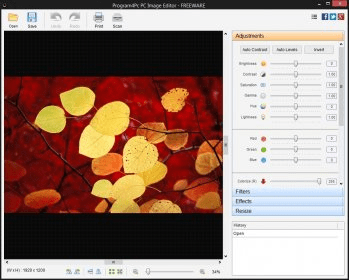
PC Image Editor is a user-friendly app that provides you with four powerful tools to improve and transform your images with ease. Whether you're correcting exposure, adding artistic filters, or resizing your photos, this free photo editor makes the process simple and enjoyable. With just a few clicks, you can enhance your photographs and other image files without any hassle.
Supporting all popular image formats such as BMP, TIFF, JPG, PNG, GIF, and more, this photo editor allows you to import and export images effortlessly. You can even import images directly from a scanner, offering maximum flexibility. Though the app works with one image at a time, it still offers a wide range of editing features, including the ability to rotate, resize, and apply various effects to enhance your photos.
The "Adjustments" section allows you to fine-tune your images, adjusting brightness, contrast, saturation, hue, gamma, and lightness. With the Auto Contrast and Auto Levels features, you can instantly improve the quality of your photos with a single click. Additionally, the “Invert” function offers an opportunity to explore creative color variations and unique visual effects.
PC Image Editor also includes a variety of filters to modify the sharpness, blur, and texture of your images. From zoom and motion blurs to Gaussian and mosaic effects, this app has a wide range of options to customize your photos. You can combine multiple effects, and the real-time preview window ensures you can experiment until you get the perfect result. Whether you're adjusting sharpness, adding embossing, or applying noise effects, you’ll be able to create stunning images.
Enhance your images further with tools that allow you to rotate, flip, skew, or change the perspective. Resizing images is also a breeze, with options to set custom dimensions, percentages, or choose from predefined profiles suited for web and mobile devices. Whether you’re preparing photos for social media or just want to make them look their best, PC Image Editor is a great tool for creating professional-looking images quickly and easily.