 PhotoScapePhotoScape
 Easy Accounting
 osh Toolkit
 cc-Modeler Pro
 SolidWorks Enterprise PDM
 Nicky Romero Kickstart
 SteelSoftTV
 AutoScreenShot
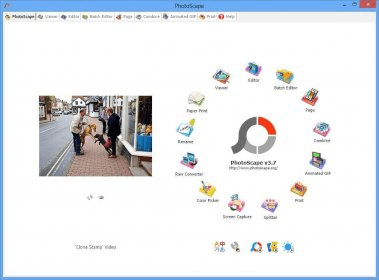
 PhotoScape (PhotoScape.exe). PhotoScape performs various operations needed for editing photographs. These include viewing, printing, composing and editing.
Enhance, edit, and manage your images effortlessly with PhotoScape. This versatile app lets you view, adjust, and organize photos, whether you're fixing red eyes, changing colors, or renaming batches of files. Additionally, you can merge images, perform face searches, and convert RAW files to JPG—all in one place.
PhotoScape is the ultimate tool for photographers and image enthusiasts, offering a wide range of editing features. Whether you want to crop, resize, apply effects, or remove imperfections like red-eye and moles, PhotoScape has you covered. Its user-friendly interface supports seamless navigation, with tabs dedicated to various tasks like editing, viewing, and batch processing. While the interface could use some improvements for easier navigation, its capabilities are extensive for most everyday photo tasks.
The app supports multiple tabs like Viewer, Editor, Batch Editor, Animated GIF creator, and more. You can create collages, print images, and even convert RAW camera files to a more accessible JPG format. Plus, the app offers unique features like tilt-shift effects, graduated tints, and clone stamping, making it stand out from other photo tools. Although it doesn’t compete with the industry’s top editors, it’s perfect for casual users and anyone needing a free, powerful image editor.