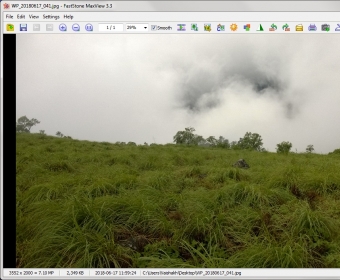
 FastStone MaxViewFastStone MaxView
 PerformanceTools
 DJ Music Mixer
 Abacus Accounts Lite
 Water Tower 3D
 Discus Labeling Software
 1-Click Answers
 MessLess Inventory Classic
 FastStone MaxView (MaxView.exe). MaxView is an image viewer that supports all major graphic formats.
Fast, Full-Detail Image Viewing and Editing for Effortless Photo Management
FastStone MaxView delivers a clean, high-speed image viewer designed for anyone who wants simple navigation, precise detail, and essential editing tools. Optimized for photographers and everyday users, it supports an extensive range of formats and offers smooth workflow features ideal for tasks like digital photo organization, creative editing, and quick image annotation. Extra conveniences—such as archive browsing and full-screen previews—add the polish needed for a modern, user-friendly photo viewer.
With wide compatibility for JPEG, PNG, PSD, raw camera formats, and more, the program lets you browse entire folders using just your keyboard. You can even preview images stored inside ZIP, RAR, and 7Z archives, including password-protected ones. Whether you're managing a large photo library, preparing visuals for social media, or optimizing files for graphic design, FastStone MaxView provides a streamlined experience supported by high-traffic features like “fast photo organizer,” “lightweight image editor,” and “simple photo enhancement tools.”
Editing essentials—crop, rotate, resize, sharpen/blur, color and lighting adjustments—are all available, along with annotation tools such as arrows, shapes, and text. You can import directly from scanners and cameras, print your photos, or send them via e-mail. A built-in Magnifying Glass, customizable slideshows, and immersive full-screen viewing complete the experience, making it easy to explore images in full clarity. Try it free for 30 days to unlock a smooth, reliable, and feature-rich workflow.
- Supports JPEG, BMP, GIF, PNG, PSD, raw formats, and more, plus ZIP/RAR/7Z archive browsing
- Includes resize, crop, rotate, sharpen/blur, color tuning, and annotation tools
- Features full-screen mode, Magnifying Glass, and instant slideshow creation
- Allows direct camera import, scanner acquisition, printing, and e-mail sharing
- Delivers fast navigation ideal for large photo libraries and everyday editing tasks