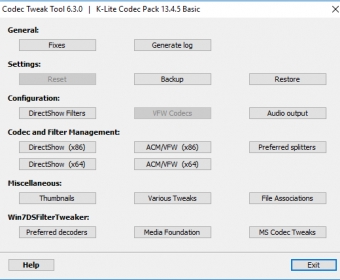
 K-Lite Codec Tweak ToolK-Lite Codec Tweak Tool
 Native Instruments Reaktor
 WatchGuard System Manager
 StockwareData
 DataBox
 Sprint-Layout
 Fine Metronome
 RES ONE Workspace
 K-Lite Codec Tweak Tool (CodecTweakTool.exe). With this tool you can do things like...
K-Lite Codec Tweak Tool is a powerful, free toolkit designed to help you manage and optimize all the audio and video codecs on your system. With this comprehensive utility, you can easily enable or disable various DirectShow filters, DirectX Media Objects, ACM/VFW codecs, and even back up and restore your codec settings. It’s the ultimate solution for anyone using the K-Lite Codec Pack or dealing with multimedia codecs.
This versatile tool is perfect for users who need detailed control over their system’s multimedia settings. While some advanced features require a basic understanding of video encoders and decoders, the K-Lite Codec Tweak Tool also offers easy-to-use utilities for more straightforward tasks. For example, you can fix broken codec-related entries in your Windows registry or reset your settings to recommended values with just a click. You can also manage which codec or splitter handles specific containers on your system. It's a must-have tool for anyone who works with media files and wants to optimize their experience.
Whether you’re troubleshooting or customizing your codec setup, K-Lite Codec Tweak Tool gives you the power to fine-tune your system’s multimedia performance. By enabling new codecs or disabling those you no longer need, you can ensure your system runs smoothly and efficiently.