 BracketsBrackets
 VipBoxSportsApp
 A123 Health Mp3
 DgFlick Video Xpress STD
 F-Billing Revolution
 True Tax Calculator 2005
 Blackboard Collaborate Launche
 MailStyler
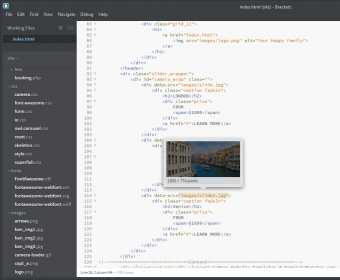
 Brackets (Brackets.exe). Brackets is an open source text and code editor for designing web applications.
Brackets is a free, open-source text editor designed specifically for web development. It is particularly useful for front-end developers and integrates seamlessly with popular tools from Adobe and Google. With its user-friendly interface and lightweight design, Brackets allows developers to dive right into their work without any steep learning curve. The editor offers a minimalist layout, but with plenty of customization options to make your coding environment feel just right.
As one of the most effective code editors for web design, Brackets features automatic code completion, syntax highlighting, and recognition of reserved words. It works perfectly with widely-used JavaScript frameworks like AngularJS and supports CSS preprocessors such as LESS and SCSS. The editor also includes a convenient text folding feature, helping you focus on the code you're working on. Although it doesn't support Stylus, it can handle CSS code hints within PHP files and offers fast, reliable search across multiple files. Whether you're working on small projects or large-scale applications, Brackets enhances your productivity with its powerful tools.
One of Brackets' standout features is its Live Preview mode, which allows you to instantly view changes in your code directly in Google Chrome. This real-time preview lets you make adjustments in the editor while seeing how they affect the design. Brackets also includes developer tools similar to Chrome's dev tools, making debugging and editing even easier. Another cool feature is the ability to preview images linked in the code, so you can hover over an IMG tag and instantly see the corresponding image within the editor.
Brackets supports a wide range of extensions, which can be installed directly from the web or via local ZIP files. These extensions expand the functionality of Brackets, adding features like a WYSIWYG editor, the ability to interpret PSD files (extracting colors, gradients, fonts, and layers), and enhanced code completion for additional programming languages and frameworks. If you're a developer, you can even create your own custom extensions using Brackets' open API to tailor the editor to your needs.
While Brackets is not a full-fledged Integrated Development Environment (IDE), it is a robust and flexible text editor that easily adapts to your workflow through plugins and extensions. However, it does have limitations, such as a lack of support for version control software, which is essential for team-based development projects. Despite this, Brackets remains a powerful tool for individual web developers seeking an efficient and customizable coding experience.