 SkitchSkitch
 Pixsta
 AnyMP4 MKV Converter
 Spyder3Utility
 Fast Browser Cleaner
 Trenton Calcu-Load 2000
 NiceHash Miner 2
 fragMOTION
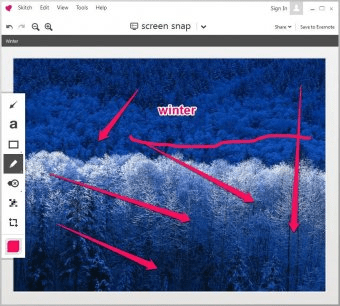
 Skitch (Skitch.exe). Skitch is a program that allows you to get your point across with fewer words using annotation, shapes and sketches...
Skitch is the ultimate solution for quickly capturing, editing, annotating, and sharing your screenshots. Whether you're working on a project, need to highlight key areas, or simply want to share an idea, Skitch offers a simple yet powerful toolset for all your screenshot needs. Capture any part of your screen, save it as an image, and annotate with a variety of easy-to-use tools. Export your images in popular formats like PNG, JPG, BMP, or TIFF, or upload directly to social media platforms like Facebook, Twitter, or LinkedIn. Perfect for both personal and professional use, Skitch streamlines the way you work with images.
Skitch’s sleek, user-friendly interface is designed to be intuitive, even for beginners. Its basic editing tools, like Arrow, Pen, and simple shapes, allow you to highlight key details with ease. While Skitch is ideal for quick annotations and sharing, more advanced editing tasks may require other tools. Nonetheless, its streamlined features make it a go-to for anyone needing to annotate or capture ideas on the go. And since it's free, there's no risk in giving it a try!
Whether you're a student, professional, or casual user, Skitch helps you capture, edit, and share images effortlessly. Take advantage of its fast, easy-to-use tools to enhance your screenshots, organize your ideas, and share them instantly.