Free Screen Video Capture by TopviewsoftFree Screen Video Capture by Topviewsoft
 iNet Protector
 LOOK
LOOK Bill Express
 Afghanistan Corporate Records
 Nero MediaHome
 TempTale Manager Desktop
 MP3 Encoder
 Free Screen Video Capture by Topviewsoft (videocapture.exe). Very few screen-recording utilities are as straightforward...
Free Screen Video Capture by Topviewsoft is the ultimate solution for effortless screen recording, enabling you to capture anything on your desktop or any selected portion of it. Perfect for creating tutorials, gameplay videos, presentations, and more, this tool allows you to produce high-quality videos with just a few clicks. Whether you're recording in AVI, MPEG4, or DivX formats, this user-friendly utility simplifies the process without compromising on quality.
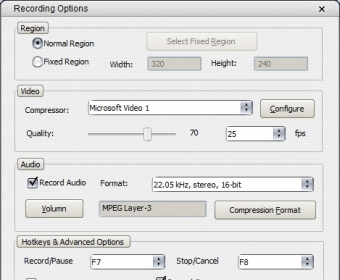
Designed for ease of use, Free Screen Video Capture features a minimal interface with only the essential options to get the job done quickly. With customizable hotkeys for Record/Pause and Stop/Cancel, you can easily control your recordings without leaving the main window. The Recording Options window allows you to select your desired capture area, adjust video/audio compression settings, and decide whether to record cursor movements. You can even fine-tune the video quality before starting your recording session.
Once you have set your preferences, simply click the “Record” button or use your assigned hotkey to begin capturing your screen. If you didn’t select a fixed capture area, just define it with your mouse. When the recording begins, four blinking green corners will indicate that everything is set. Easily pause, stop, or cancel the recording at any time. Save your final video in the format and quality you prefer—it's that simple.
Free Screen Video Capture by Topviewsoft offers the perfect balance of simplicity and customization. This intuitive screen recording tool is ideal for anyone looking to create animated presentations or tutorials without spending on expensive software or dealing with complicated interfaces. Discover an easier way to capture and share your screen today!