DraftSightDraftSight
 CyberLink AudioDirector
 Cylance PROTECT
 Spamihilator
 Ultra Video Splitter
 Termite
 DB Viewer
 iMediaHUD
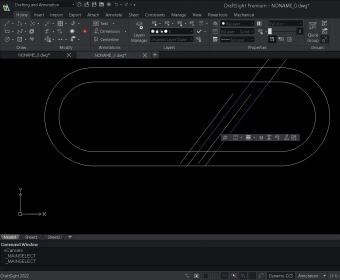
 DraftSight (DraftSight.exe). DraftSight lets you create professional 2D and 3D CAD drawings in DWG format.
Experience a clean, minimal interface designed for effortless creation, editing, markup, and viewing of 2D drawings—ideal for anyone transitioning from other CAD apps. With production tools, an API, and a simple workflow, this is a powerful professional CAD drafting software built for speed and precision.
DraftSight enables CAD users to efficiently create, view, and manage DWG and DXF files. Even beginners with basic CAD knowledge can navigate its intuitive setup and tools, supported by a smooth installation process. Its modern GUI uses clear sections and large icons, making it quick to access features and maintain a productive CAD workflow.
The software includes advanced capabilities such as G-Code Append for customizable interface extensions, broad format compatibility (DWG, DXF, DWT), and versatile drawing tools for text, shapes, masks, and tables. Recent enhancements let you click anywhere on dimensions to reposition them with automatic alignment widgets—ideal for architects and engineers looking for a high-efficiency 2D CAD drawing tool. A command interface also lets users input precise coordinates, distances, and angles for accurate drafting.
Though it focuses solely on 2D drawing and may require significant system resources, DraftSight remains a compelling option for anyone seeking reliable DWG editing for architects, designers, and technical professionals.
• Minimal, modern UI for fast navigation and improved CAD productivity workflow
• Supports DWG, DXF, and DWT formats with a full suite of drafting and formatting tools
• G-Code Append functionality for customizable interface enhancements
• Enhanced dimensioning with click-anywhere repositioning and automatic alignment
• Precise command input for coordinates, angles, distances, and detailed 2D drafting