 CyberLink AudioDirectorCyberLink AudioDirector
 Nextion Editor
 All File Email Extractor
 JadeverScaleSoft
 eXtra Voice Recorder
 Amadeus II
 Equalify
 Simplified Style Player
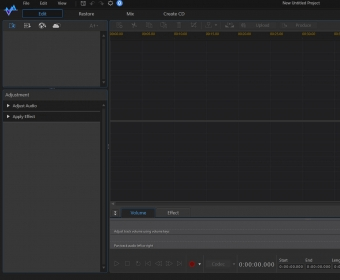
 CyberLink AudioDirector (AudioDirector3.exe). CyberLink AudioDirector can help you enhance the quality of the audio tracks in your videos.
CyberLink AudioDirector is a professional audio editing software that lets you improve the sound quality of your videos and audio tracks. Offering a range of editing tools, it provides everything from basic trimming and cutting to advanced audio repair and enhancement. With a user-friendly interface that is easy to navigate, even beginners can get started quickly. However, for users looking to fully utilize its features, a bit of exploration in the manual may be necessary.
Whether you're working with audio or video files, CyberLink AudioDirector supports a wide variety of formats, allowing you to import and export media seamlessly. The software includes advanced tools to repair common audio issues like background noise, clicks, and hums. You can even create your own recordings or download clips directly into the program for further editing. Plus, the Visual Repair mode helps you identify and correct issues more efficiently.
For detailed audio editing, CyberLink AudioDirector provides a versatile timeline for trimming, cutting, and arranging tracks. You can add silence, remove unwanted noise, or reposition segments. The software allows for precise synchronization of multiple audio tracks and lets you zoom in for even greater accuracy. In addition, a variety of special effects are available to customize your audio, such as pitch shifting, fade-ins/outs, reverb, and more.
CyberLink AudioDirector supports exporting to popular audio formats like WAV, MP3, WMA, and M4A, as well as burning audio to CDs. Video projects can also be saved in a variety of formats. Whether you're a novice or a seasoned pro, CyberLink AudioDirector offers powerful editing features to take your audio and video content to the next level.