 Virtual Audio StreamingVirtual Audio Streaming
Virtual Audio Streaming (VirtualAudioStreaming.exe). Virtual Audio Streaming is intended to enhance the quality of your computer’s audio output...
Virtual Audio Streaming is the ultimate tool for improving the quality of your computer’s audio output. It functions by installing a virtual sound card, offering an advanced solution to the limitations of physical sound cards that prevent capturing internal sound. This powerful tool enables you to record audio from any source on your system – whether it’s a microphone, a file, voice chats, games, or even online radio stations. Plus, it lets you broadcast audio streams to other applications effortlessly.
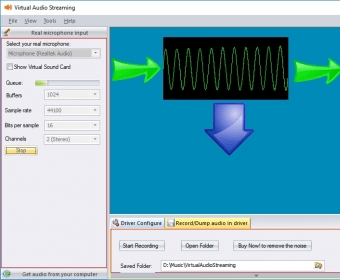
The user interface is sleek and modern, designed with three distinct panels for easy navigation. While it may seem complex at first, you'll quickly become familiar with its features. The left panel focuses on configuring input settings like source selection (including your microphone), buffer size, sample rate, bit depth, and number of channels. The right panel mirrors these settings for output configuration. Meanwhile, the bottom panel allows you to adjust the driver settings and record audio directly to a WAV file. Virtual Audio Streaming supports a wide range of audio formats, from 40KHz to 192KHz and 8-bit to 24-bit audio quality.
While the tool offers a free version, the trial comes with some limitations, including audio recordings with unwanted noise. However, the full version removes these restrictions and provides a smooth, high-quality audio experience. Virtual Audio Streaming is an excellent choice for anyone looking to enhance their PC's sound capabilities without overloading the system’s resources.
 AC-3 ACM Codec
 mricrogl
 AMR Player
 Quote EZ
 Yamaha LS9 Editor
 LightSpeed
 JiNa OCR Image To Text