LPK25 EditorLPK25 Editor
 Lodgit Desk
 Native Instruments Kontakt
 ArcSoft TotalMedia Theatre
 Bytescout Post2Blog
 Mailings Lite
 Power Mp3 Cutter (Mp3 Sound Cu
 MobilniBanka
 LPK25 Editor (Akai LPK25 Editor.exe) free download, latest version ✅5.0.5.36470, Always connect the LPK25 to your computer before opening the software editor.
Always connect the LPK25 to your computer before opening the software editor. This optimized guide helps you get started quickly—ideal for users searching for the best MIDI controller software or a simple USB keyboard configuration guide.
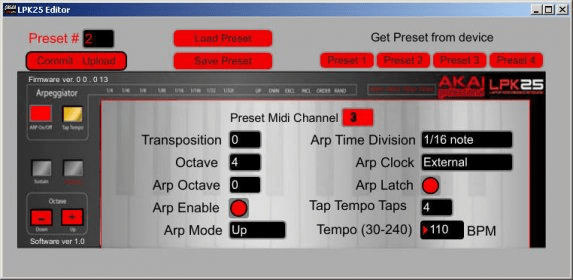
After launching the editor, select the LPK25 from the drop-down menu and click “Done.” The interface gives you clear tools to edit, save, or load presets, making it easy to streamline your creative setup and learn how to edit MIDI presets without hassle.
Use the preset controls at the top of the window to manage sounds, recall saved configurations, and upload your customized settings directly to the LPK25.
- GET PRESET – Select a preset (1–4) currently stored on the LPK25 to display its settings in the editor. - PRESET # – Choose the slot number that the active preset will use when uploaded to the LPK25. - COMMIT – UPLOAD – Send the currently displayed preset to the LPK25 using the selected preset number. - SAVE PRESET – Store the active preset on your computer for future use. - LOAD PRESET – Import a previously saved preset and view it instantly in the editor.