 AVS Audio RecorderAVS Audio Recorder
 EZ WAV Resize
 Atrex
Atrex 5 Icons Income
 Free MP3 Cutter
 Android Magazine App Maker Pro
 Midas
Midas DWG TrueView 2009
 AVS Audio Recorder (AVSAudioRecorder.exe). AVS Audio Recorder is a recording tool that lets you capture sound from a variety of sources.
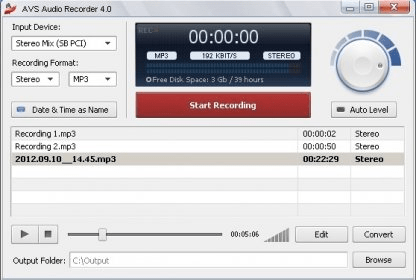
AVS Audio Recorder is a free and versatile tool designed to capture high-quality sound from a variety of sources. Whether you're recording audio from a microphone, line-in, audio CD, podcasts, online streams, or Skype calls, this app makes it simple to save any sound that comes through your computer’s sound card. Ideal for both casual users and those looking for an easy recording solution, AVS Audio Recorder is your go-to tool for seamless audio capture.
The user-friendly interface of AVS Audio Recorder makes the recording process effortless. All you need to do is select your input device and recording format, with options like MP3, WMA, and WAV. The app automatically adjusts to default audio quality settings for each format, so you don’t need to worry about manual configuration. Additional features include volume level control and automatic file naming based on the current date and time for quick organization. With AVS Audio Recorder, you can start recording in just a few clicks!
The recorded files are displayed on the main screen, where you can easily rename, view file information, and even edit or convert them to different formats using the optional AVS Audio Editor. While AVS Audio Recorder offers basic recording features, it’s perfect for users who need a reliable, straightforward solution for occasional audio recording. For more advanced features, you can always explore AVS Audio Editor for deeper editing and conversion options.