
App Introduction
Fast, Reliable Mobile Printing for Canon Devices with Seamless Wireless Control
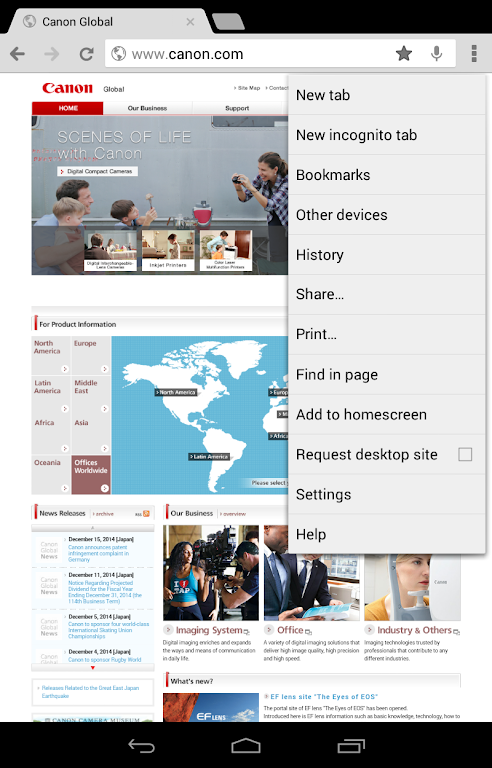
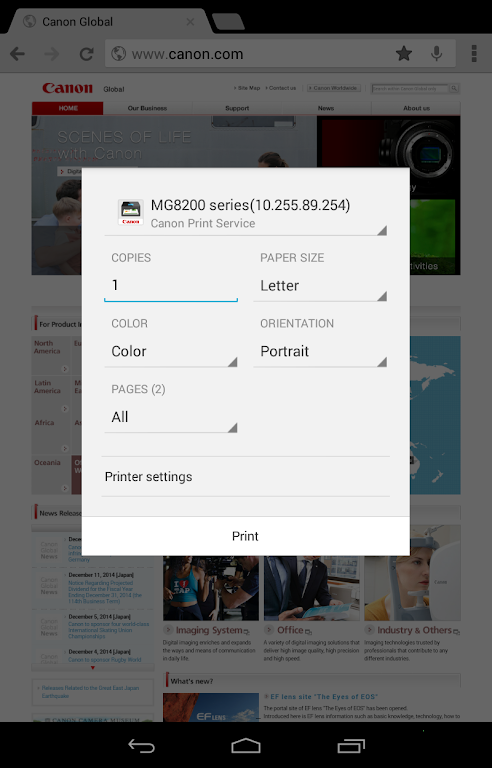
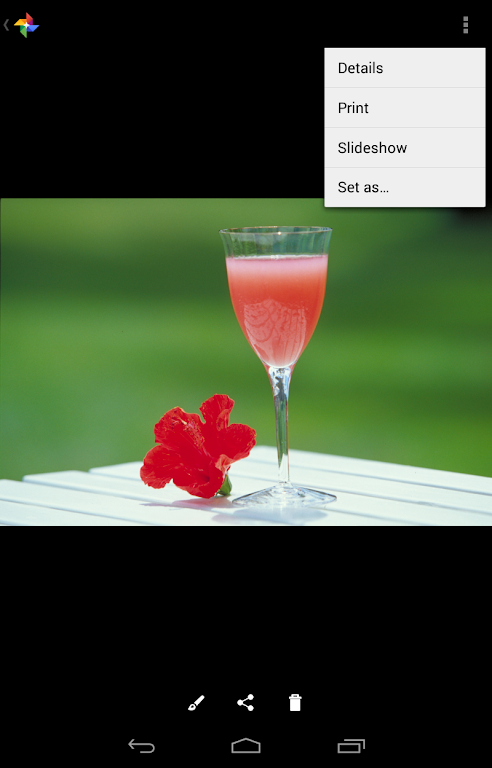
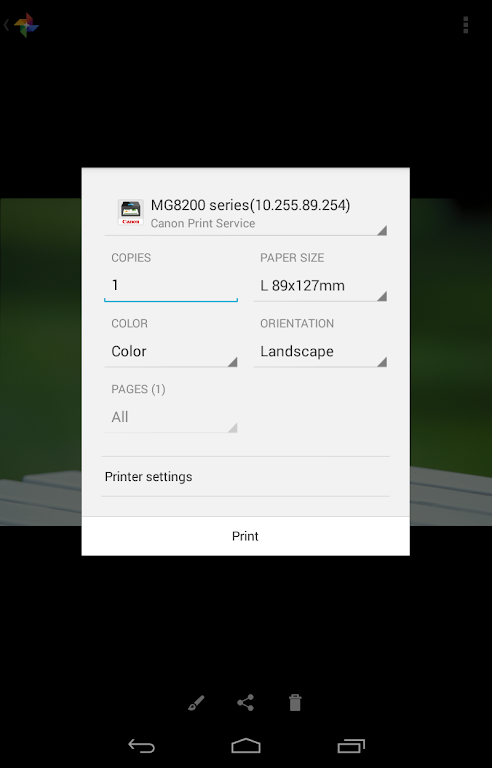
Canon Print Service lets you print directly from apps that support Android’s native printing system—no extra steps required. Easily send documents, photos, and PDFs from your smartphone or tablet to compatible Canon printers on your Wi-Fi network. Designed for smooth performance, it’s ideal for home, school, and office users who want quick mobile printing, cloud printing convenience, and simple wireless printer setup.
Whether you’re handling daily paperwork or high-quality photo prints, the service gives you intuitive controls, flexible print options, and dependable results. Enjoy a streamlined mobile workflow with features that support professional printing, small business productivity, and wireless document management.
Main features:
- Switch between full-color and black-and-white printing
- 2-sided printing for efficient, eco-friendly output
- 2-on-1 printing to save paper and organize content
- Borderless printing for photos and creative projects
- Stapling, paper type selection, secure printing, Department ID management, PDF direct printing, printer discovery by IP, and sharing-menu recall
* Available settings may vary depending on your printer model.
* When opening the app, if prompted for notification permission, please tap “Allow”.
If you are using a device with Android 6 or earlier:
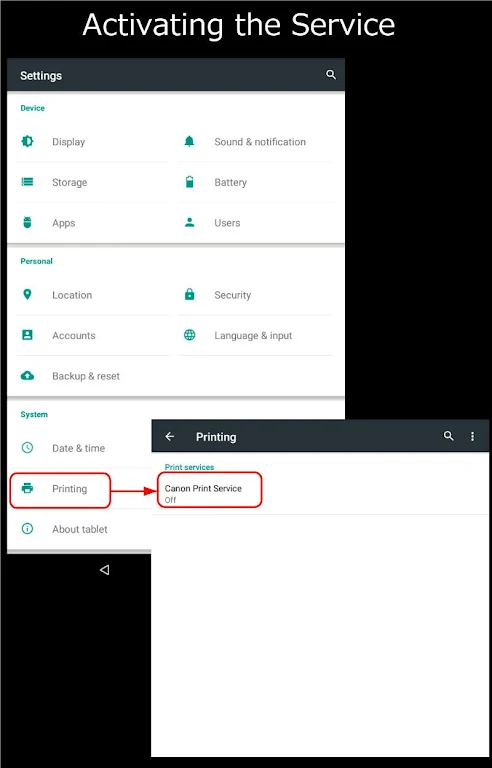
Canon Print Service must be activated before use. It is not enabled automatically after installation. Activate it through one of these methods:
- Tap the notification shown immediately after installation to open the settings screen and enable the service.
- Go to [Settings] > [Printing] > [Canon Print Service], then enable the service.
* On Android 7 or later, the service activates automatically after installation.
Compatible printers:
- Canon Inkjet Printers
PIXMA TS series, TR series, MG series, MX series, G series, GM series, E series, PRO series, MP series, iP series, iX series
MAXIFY MB series, iB series, GX series
imagePROGRAF PRO series, GP series, TX series, TM series, TA series, TZ series, TC series
*Except for some models
- imageFORCE series
- imageRUNNER ADVANCE series
- Color imageRUNNER series
- imageRUNNER series
- Color imageCLASS series
- imageCLASS series
- i-SENSYS series
- imagePRESS series
- LBP series
- Satera series
- Laser Shot series
- Compact Photo Printers
SELPHY CP900 series, CP1200, CP1300, CP1500
App Size: 38 MBApp Version: 2.13.0
System Requirements: AndroidUpdate Time: 2025-12-20
Language: ENDeveloper: Canon Inc.
Rec Apps

HealthTotal 279 Apps








news
Pokémon Go welcomes Hisuian Lilligant to the fray on an exclusive Raid Day later this month
12-26Street Patrol Command lets you patrol the borders as a rookie cop in the 80s, coming soon to iOS
12-26Fruit Ninja Classic+ carries forward its Bluey crossover with the Sticky Gecko event
12-26PurrbitPop offers fast-paced match-3 madness with a shapeshifting twist, out now on iOS
12-26Angry Birds Bounce is out now on Apple Arcade, bringing brick-breaking action to the classic series
12-26Torerowa opens pre-registration for the isometric extraction hack 'n slash
12-26Play Together lets you bring back the prehistoric era in this massive dino-filled update
12-26Wrathbound Interactive has opened pre-registration for its high-octane, sci-fi racer, CYGRAM
12-26Mo.co is now available to play worldwide so you can ditch the invite-only FOMO
12-26Marvel Contest of Champions launches Fantastic Four-themed content to hype up the upcoming film'
12-26
Hot Apps


-
1
-
2
Robot Subdolous Ireful Inbreak
Action -
3
Heroes vs Hordes: Survivor RPG
Adventure -
4
Ramon World Adventure Free
Adventure -
5
Flying Ball
Adventure -
6
Witch and Council : Idle RPG
Adventure -
7
Mimpi Dreams
Adventure -
8
archer escape
Adventure -
9
Shadow Fight 2
Action -
10
Police Car Chase - Cop Games
Action


Hot Categories
- All
- Tools
- Entertainment
- Communication
- Social
- Music & Audio
- Photography
- Video Players
- Personalization
- Productivity
- Sports
- Education
- Lifestyle
- Books & Reference
- Shopping
- Business
- Health & Fitness
- Travel & Local
- Food & Drink
- Maps & Navigation
- Beauty
- Comics
- Dating
- Events
- News & Magazines
- Weather
- House & Home
- Libraries & Demo
- Medical
- Parenting
- Art & Design
- Auto & Vehicles