BlueJBlueJ
 School Library System
 CyberLink YouCam
 Sage Simply Accounting
 Viber
Viber bounceIt!
 Native Instruments Controller
  Wonder Lister
 BlueJ (bluej.exe). A free Java Development Environment designed for beginners, used by millions worldwide.
BlueJ is a powerful, open-source Integrated Development Environment (IDE) designed specifically for beginners learning Java programming. Its user-friendly interface, interactive features, and intuitive design make coding easier and more enjoyable for students and educators alike.
BlueJ provides an accessible virtual environment where users can easily edit, compile, and debug Java code. Whether you're new to programming or just looking for an educational tool to sharpen your Java skills, this IDE offers a range of features that help you learn faster and with less frustration.
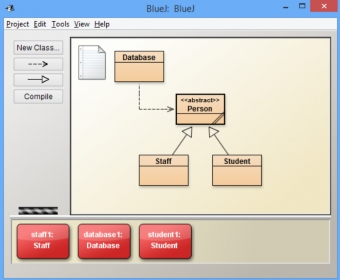
The interface is simple yet effective, with a minimalistic design featuring a top menu bar and a left-side panel. The color-coded layout makes it easy to identify code fragments, spot errors, and keep track of variables. Despite its straightforward design, BlueJ’s performance is smooth, responsive, and reliable, making it an ideal choice for Java learners.
One of the standout features of BlueJ is its high interactivity. You can interact directly with objects, inspect their values, and invoke methods in real-time, providing a hands-on experience that other IDEs may lack. Additionally, its built-in tutorial guides beginners step-by-step through the learning process.
BlueJ's system stability and innovative features make it a valuable tool for anyone wanting to learn Java. From a powerful debugger to customizable keyboard shortcuts, BlueJ has everything you need to get started with programming. The software may not boast flashy designs, but its functionality and ease of use make it a top choice for educational purposes.