 AnyPic JPG to PDF ConverterAnyPic JPG to PDF Converter
 Gmail Extract Email Addresses
  Sound Player Plus
 SpellGen
 Free Photo Slide Show
 UltraDVD
 Audia
Audia McAfee AntiVirus Plus
 AnyPic JPG to PDF Converter (AnyPicJpgToPdfConverter.exe). AnyPic JPG to PDF Converter allows you to convert as many images as you want to one or more PDF...
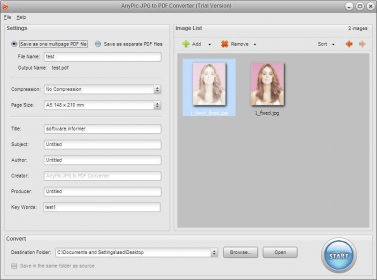
AnyPic JPG to PDF Converter is the ultimate tool for quickly converting your images to PDF files with minimal effort. Whether you need to convert one image or batch process dozens, this powerful converter offers advanced features that allow you to easily organize and customize your PDFs. It's perfect for anyone looking to streamline the process of converting images into high-quality PDF files.
The simple installation and user-friendly interface make AnyPic JPG to PDF Converter incredibly easy to use. With just a few clicks, you can have the software up and running, ready to convert your images in no time.
Supporting a wide range of image formats like JPG, BMP, GIF, TIFF, and PNG, AnyPic lets you arrange images in the desired order by name, date modified, type, or size. You can convert entire albums into one PDF or create separate PDFs for each image. Plus, with customizable settings like page size, compression ratio, and metadata fields (Title, Subject, Author, etc.), it offers a level of flexibility not found in typical JPG to PDF converters. Simply select your images, choose your settings, and hit “Start” – it's that easy!
Depending on the number and size of your images, the conversion time may vary, but the process is quick and efficient, even for large batches of photos.
In short, AnyPic JPG to PDF Converter is the perfect solution for anyone who needs a fast, simple, and flexible way to convert images to PDF format without any hassle.