JPEG ImagerJPEG Imager
 Adobe CS6 Design and Web Premi
 Dental Information Management
  AccountEdge
 Syrinscape Fantasy Player
 Google App Engine
 CWA Reminder by We-Care.com
 Easy GIF Animator
 JPEG Imager (ji2.exe). Thanks to technological advances, having a large number of image files and photos stored in your hard drive is becoming...
If you have a large collection of photos and image files taking up valuable space on your hard drive, JPEG Imager is the perfect tool to help you strike the right balance between image quality and file size. Whether you need to reduce the size of your photos for storage or sharing, this app offers a comprehensive solution that ensures minimal quality loss.
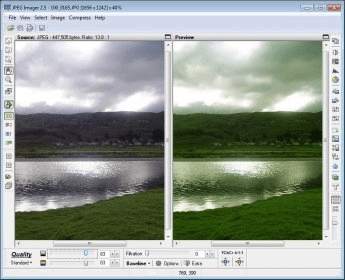
JPEG Imager allows you to compress your images using advanced settings for optimal results. You can adjust various parameters such as luminance quality, chrominance quality, filtering, and subsampling schemes. The app displays a side-by-side comparison of the original and modified images in real time, making it easy to preview the effects of your adjustments. You can save your images in multiple formats including JPEG, PNG, GIF, and even JPEG XR (experimental). In addition to compression, JPEG Imager also includes a set of powerful image editing tools, like resizing, rotating, cropping, and adding text, giving you complete control over your images.
For users who need to process multiple files, JPEG Imager offers batch processing capabilities, allowing you to optimize multiple images at once. While the app provides a robust set of tools, it’s best suited for users with some prior knowledge of image editing due to the variety of settings and options available.