 Sketch DrawerSketch Drawer
 Home & Business Attorney
 Sumac
Sumac Show Me
 Dynamic Info Screen
 TechnoRiverStudio
 StationPlaylist Creator
 Mel Bay On Demand
 Sketch Drawer (SketchDrawer.exe). Turning a photograph into an artistic sketch using a set of pencils requires not only a lot of talent but also a great...
Transforming a photo into an artistic pencil sketch requires both skill and patience, but with Sketch Drawer, it’s easier than ever! This intuitive app allows you to turn any digital image into a beautiful sketch in just a few simple steps. The final results look as if you’ve drawn them yourself, and with batch conversion, you can process as many images as you want, quickly and efficiently.
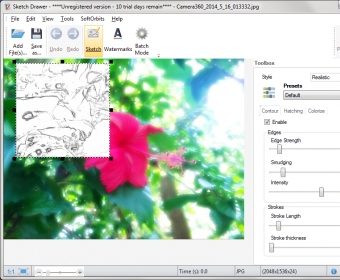
Sketch Drawer is designed with simplicity in mind, offering a variety of presets organized by sketch type. Choose from detailed sketches, realistic sketches, classic sketches, and more. Each style comes with multiple options like pen, felt-tip pen, professional color sketch, expressive, pop art, and schematic sketches. While detailed sketches have fewer presets, you can always customize existing ones or create your own unique styles. Adjust the intensity of the edges, vary stroke length and thickness, and add color pencils or keep the classic black-and-white look to suit your creative vision.
Enjoy full control over your transformations with a live preview feature. You can move the preview window around your photo to see how your changes will impact different areas of the image. Once you’re satisfied with the preview, simply click “Run” to apply the changes and generate the final pencil sketch. While the program processes each change, you’ll see Sketch Drawer’s precision at work, with every stroke being carefully applied to your image, layer by layer. Keep in mind that larger edits may cause temporary lag, so it’s best not to overwhelm the app with too many commands at once.
While Sketch Drawer isn’t free, its results justify the price. Before purchasing, you can try the free version to see if it meets your expectations. Turn your photos into personalized, professional-quality sketches with ease!