
Location: Home > Softs > Design & Photo > 3D Modeling

QA-CADQA-CAD

Local Multi-thread Download
Total Downloads:

QA-CADSoftware Introduction Download Link

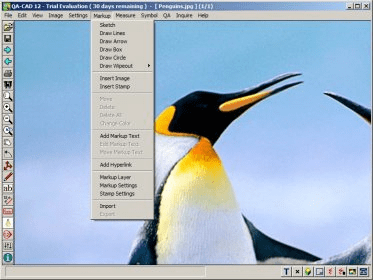
QA-CAD Screenshot of the interface QA-CAD (qa10.exe). QA-CAD 12 is an essential tool in the engineering design process.

 
  • Fast, Accurate QA Stamping Software for Seamless Engineering & CAD Workflow

    QA-CAD 12 streamlines every stage of the engineering design and inspection process. If you’re still manually plotting drawings or adding numbered stamps and revisions by hand, this tool eliminates repetitive tasks and boosts productivity. Its powerful QA stamping engine overlays your drawings with auto-numbered stamps, markup notes, sketches, boxes, lines, and arrows—helping teams deliver consistent, audit-ready documentation.

    Built for modern engineering environments, QA-CAD 12 supports precise revision tracking, automated annotation workflows, and efficient data capture. It’s ideal for teams seeking faster CAD quality checks, lean document control, and a smoother digital approval process. With enhanced usability and compatibility, it fits effortlessly into high-volume drafting pipelines, including mechanical, architectural, and manufacturing QA workflows.

    Main Features:
    • AutoCAD 2015 support for reliable integration across engineering and drafting teams
    • User-defined Time / Date / “Checked by” stamp for consistent revision control
    • Color changer plus 20 stamping ink options for clear, customizable markups
    • Overlay drawings with unlimited QA stamps and markup annotations for rapid review cycles
    • Additional QA general tolerance tables for accurate standards compliance
    • Automatically numbered, fully configurable stamps with adjustable sizing and rotation
    • Add leaders to stamps and alter the numbering system anytime during the stamping process
    • Embed field-based data or attributes in QA stamps, including dropdown lists of user-defined values
    • Capture dimension values directly from drawings to speed up inspection reports
    • Export embedded data to spreadsheets (Excel) for revision management and inspection tracking
    • Save QA stamps and markup annotations separately, or export stamped drawings to PDF, DWG, DXF, TIFF, and more
    • Open and stamp vector (DWG, DXF, HPGL/2, DWF), pixel (TIFF, JPG, BMP), and PDF formats for maximum flexibility

    Download AddressQA-CAD Official Download 64-bit Download Address

    Super-fast Download

    Super-fast Download 1 Super-fast Download 2

    Local Download

    Download1 Download2

    本站所有软件来自互联网,版权归原著所有。如有侵权,敬请来信告知,我们将及时撤销。

    Copyright © 2015-2019.下载王移动站

    蜀ICP备18078962号-1