Bar Code 128Bar Code 128
 phpDesigner
 Wine Cellar 3D
 Fast BC
 G Suite Sync for Microsoft Out
 OLM Converter Ultimate
 Accu2000Barcode
 HitFilm Superhero Pack
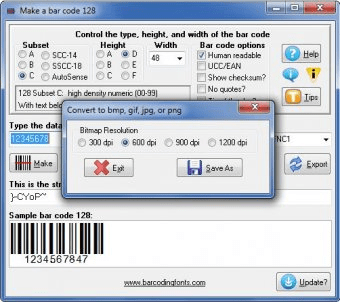
 Bar Code 128 (Bar128.exe). Code 128 lets you print any ASCII character and features a high density numeric mode.
Bar Code 128 lets you generate barcodes using six powerful types or subsets: A (A–Z, 0–9, and control characters), B (standard ASCII characters), C (high-density numeric data 00–99), SCC-14 for 14-digit shipping container codes, SSCC-18 for 18-digit serial shipping container identification, and the smart AutoSense subset that automatically switches between subsets based on your input. You can also display custom text below your barcodes (except in AutoSense mode) and choose between Standard and UCC/EAN variations. This makes it a flexible Code 128 barcode generator for Windows and professional logistics use.
To create a barcode, simply select the barcode type, adjust the height, width, and desired options, then enter your data and tap the “Make” option to generate your barcode. The preview instantly appears in the Sample Barcode window, where you can copy it to other applications or generate and print barcode labels for products, shipping, and inventory management.
Each time you generate a barcode, the program also creates a corresponding character string that is later converted into a barcode using Elfring Fonts when pasting from the clipboard. Since some Windows applications do not fully support embedded font information, you may need to manually select a barcode font to correctly visualize and print your barcode. This ensures smooth compatibility with barcode printing software, label design tools, and office applications.
- Supports all Code 128 subsets: A, B, C, SCC-14, SSCC-18, and AutoSense - Create high-density numeric, shipping, and serial barcodes with ease - Fully customizable barcode height, width, and display text - Copy, export, and print barcode labels directly from the preview window - Optimized for barcode generator for Windows, inventory tracking, and logistics workflows