 gINTgINT
 Alter/Ego
 Real Audit (tm)
 SQL Manager for MySQL
 Audio Hijack
 Sothink SWF Easy
 Software Maker Pro
 osFinancials
 gINT (gint.exe). Whether you enter borehole log data manually, or import from electronic field data...
All-in-One Subsurface Data Management and Reporting for Fast, Accurate Geological Insights
Effortlessly capture, organize, and visualize every type of subsurface information—whether you enter borehole log data manually or import it from electronic field systems, PDA tools, or other software. Once stored, you can generate consistent, high-quality reports from the same dataset, including borehole logs, well logs, fences, project summaries, and lab reports. This streamlined workflow helps teams complete geotechnical documentation faster while improving accuracy for complex ground investigations and environmental assessments.
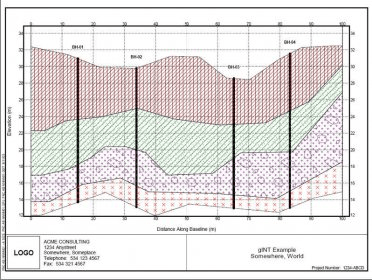
With gINT Professional, you unlock advanced tools for fence diagrams, graphs, tables, and customizable geological reports. Build detailed 2D and 3D fence diagrams to display complete subsurface datasets, enhance project modeling, and support data-driven decision-making. Create cross sections by interpreting between boreholes using built-in drawing capabilities or standard CAD applications—ideal for large-scale engineering projects, soil analysis workflows, and high-volume geodata processing.
gINT also supports full lab test data calculations. With gINT Pro, you can showcase laboratory results on specialized test reports such as Atterberg Limits, Sieve Analysis, Compaction, Moisture Density, Consolidation, Unconfined Compression, Index Properties, and more. This unified platform is designed for teams seeking reliable geotechnical reporting software, geological data automation, and enhanced field-to-office data integration.