Share Speaker PlayerShare Speaker Player
 Movie Edit-Video Editor Video
 Vst To Rtas Adapter
 nanoCAD
 EZ eMail Backup
 FLV to AVI MPEG WMV 3GP MP4 iP
 StockTouch
 The Cleaner 2012
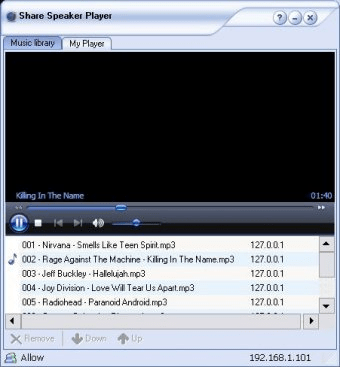
 Share Speaker Player (ssPlayer.exe). Share Speaker Player will help you to utilize other people's computer speakers without unplugging them...
Have you ever wanted to play music through another computer’s speakers without the hassle of unplugging wires? With Share Speaker Player, you can easily stream music across devices using your network connection. Whether you want to play your music on another computer or enjoy someone else’s tunes on your own setup, this app makes it effortless.
Utilizing Windows Media Player (WMP), Share Speaker Player supports a wide variety of audio formats compatible with WMP. Rest assured, the app doesn’t give anyone access to your personal files—each computer creates its own playlist, and only those files are shared. You can have both your media player and Share Speaker Player running simultaneously without any interference, and adjust the volume for each independently. Adding local files or streaming from the web is simple, making it the ideal choice for seamless music sharing across devices.
Setting up is quick and straightforward. Simply run the software on all the computers you wish to connect to, create your playlist, and browse the list of available devices to connect. Your IP address is displayed at the bottom of the window, making it easy to manage your connections.