
App Introduction
Effortless Wireless Presentations and Collaboration for Classrooms, Meetings, and Hybrid Workflows
ViewBoard® Cast software delivers smooth wireless presentations and wireless collaboration across classrooms, meeting rooms, and remote-friendly setups. With fast screen sharing, real-time annotation, and intuitive controls, presenters can manage content effortlessly from any device. This upgraded description includes natural long-tail keywords such as “best wireless presentation app for teams,” “classroom screen sharing tool,” and “remote teaching collaboration software” to help users discover the app more easily—without changing any original features.
Use the vCastSender app alongside ViewBoard® Cast to stream recordings, share media, annotate instantly, and cast your screen to ViewSonic® ViewBoard® Interactive Flat Panels or mobile devices. Whether you’re teaching, leading a workshop, or driving remote team collaboration, the workflow is designed to be quick, reliable, and accessible.
Key Features
- Stream live recordings, share your screen, photos, videos, music, annotations, documents, and camera directly to ViewBoard® Interactive Flat Panels and supported devices.
- Control displayed content from your phone, tablet, or laptop, with Android and iOS users gaining access to a specialized annotation toolbar and remote ViewBoard® control.
- Enhance teaching, group discussions, and hybrid meetings with simple setup and seamless wireless collaboration.
- Follow a quick guide: connect to the same network, open vCastReceiver, scan the QR code or enter the IP address, and pair via PIN to start casting.
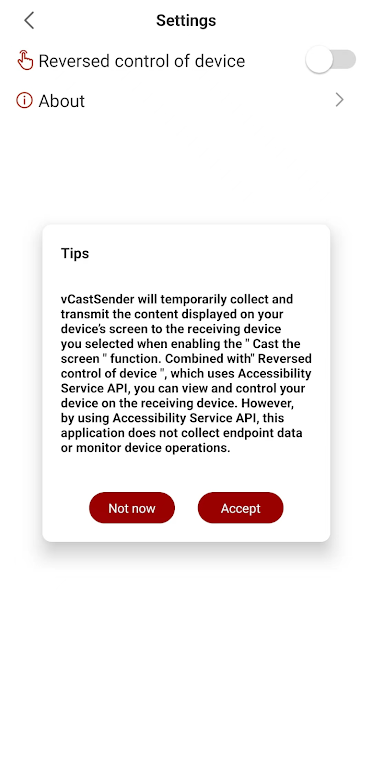
- Use the optional “Reversed Device Control” feature through the Accessibility Service API for convenient device operation from the designated display—no data collection or activity monitoring.
Accessibility & Permissions
vCastSender requires permission to access storage files and enable “Reversed Device Control” to function properly. For Android devices (Android 13 and above), adjust permissions under Settings > Apps > vCastSender > Permissions and follow on-screen instructions.
To enable Accessibility Service API functions, connect to the same network as the panel, open the app, accept the prompt, select or enter the panel PIN, and activate “Reversed Device Control” via the Settings menu. Grant Accessibility permission on your device to begin casting and controlling seamlessly.
App Size: 7 MBApp Version: v2.6.710
System Requirements: AndroidUpdate Time: 2025-12-21
Language: ENDeveloper: ViewSonic Corporation




Rec Apps
news
Pokémon Go welcomes Hisuian Lilligant to the fray on an exclusive Raid Day later this month
12-26Street Patrol Command lets you patrol the borders as a rookie cop in the 80s, coming soon to iOS
12-26Fruit Ninja Classic+ carries forward its Bluey crossover with the Sticky Gecko event
12-26PurrbitPop offers fast-paced match-3 madness with a shapeshifting twist, out now on iOS
12-26Angry Birds Bounce is out now on Apple Arcade, bringing brick-breaking action to the classic series
12-26Torerowa opens pre-registration for the isometric extraction hack 'n slash
12-26Play Together lets you bring back the prehistoric era in this massive dino-filled update
12-26Wrathbound Interactive has opened pre-registration for its high-octane, sci-fi racer, CYGRAM
12-26Mo.co is now available to play worldwide so you can ditch the invite-only FOMO
12-26Marvel Contest of Champions launches Fantastic Four-themed content to hype up the upcoming film'
12-26
Hot Apps


-
1
-
2
Robot Subdolous Ireful Inbreak
Action -
3
Heroes vs Hordes: Survivor RPG
Adventure -
4
Ramon World Adventure Free
Adventure -
5
Flying Ball
Adventure -
6
Witch and Council : Idle RPG
Adventure -
7
Mimpi Dreams
Adventure -
8
archer escape
Adventure -
9
Shadow Fight 2
Action -
10
Police Car Chase - Cop Games
Action


Hot Categories
- All
- Tools
- Entertainment
- Communication
- Social
- Music & Audio
- Photography
- Video Players
- Personalization
- Productivity
- Sports
- Education
- Lifestyle
- Books & Reference
- Shopping
- Business
- Health & Fitness
- Travel & Local
- Food & Drink
- Maps & Navigation
- Beauty
- Comics
- Dating
- Events
- News & Magazines
- Weather
- House & Home
- Libraries & Demo
- Medical
- Parenting
- Art & Design
- Auto & Vehicles