
Scan to Download
App Introduction
Effortlessly Manage and Organize Your Apps with My Apps – A Must-Have Tool for Android Users
My Apps is a powerful, user-friendly app designed to simplify the management of all your installed applications. Whether you need to launch apps, uninstall them, or share them with friends, My Apps makes it all effortless. With a variety of essential features, this app allows you to organize your apps and keep your device streamlined and efficient. Whether you’re organizing your apps for better access or need an easy way to uninstall apps, My Apps offers everything in one convenient place.
From quickly launching your favorite apps to sharing links or extracting APK files for backup, My Apps helps you manage your Android device with ease. You can even create custom shortcuts on your home screen and access detailed app information in seconds. It’s the perfect tool for anyone who wants a more efficient and personalized experience on their device.
Key Features:
- Launch Apps Instantly: Open any app installed on your device with a single tap—no more navigating through multiple screens.
- Quick Access to Google Play Store: Directly visit the Google Play Store page for any app to check for updates, read reviews, or explore more details.
- Share App Links: Easily share the Google Play Store link of any installed app with friends, family, or on social media.
- Extract APK Files: Backup or transfer your apps by extracting their APK files. Keep your favorite apps stored offline for later use.
- App Shortcuts on Home Screen: Quickly create shortcuts for your most-used apps on your device’s home screen for faster access.
- Uninstall Unwanted Apps: Remove apps you no longer need with ease. Simplify your device management with an efficient uninstallation process.
- View App Information: Access detailed information about your apps, including permissions, storage usage, and more, directly from your settings.
Additional Feature: App Batch Uninstaller
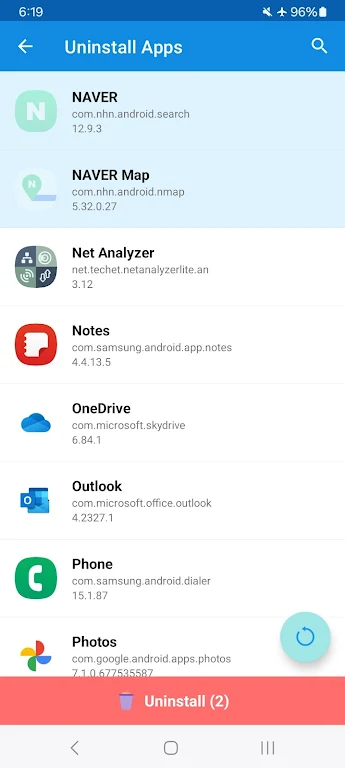
One standout feature of My Apps is its App Batch Uninstaller, which allows users to select and remove multiple apps at once. If your device is cluttered with unused apps, this feature makes it easy to quickly uninstall several apps in one go. After uninstalling, My Apps provides direct links to the Google Play Store for each app, making it simple to re-download any apps you may need in the future.
My Apps is an essential tool for anyone looking to manage their apps efficiently, keep their device organized, and ensure smooth app performance. Whether you want to remove bloatware, share app links, or organize your apps into shortcuts, My Apps offers a seamless and effective solution.
App Size: 8 MBApp Version: 2.0.0
System Requirements: AndroidUpdate Time: 2025-12-20
Language: ENDeveloper: Hyunware



Rec Apps
news
Pokémon Go welcomes Hisuian Lilligant to the fray on an exclusive Raid Day later this month
12-26Street Patrol Command lets you patrol the borders as a rookie cop in the 80s, coming soon to iOS
12-26Fruit Ninja Classic+ carries forward its Bluey crossover with the Sticky Gecko event
12-26PurrbitPop offers fast-paced match-3 madness with a shapeshifting twist, out now on iOS
12-26Angry Birds Bounce is out now on Apple Arcade, bringing brick-breaking action to the classic series
12-26Torerowa opens pre-registration for the isometric extraction hack 'n slash
12-26Play Together lets you bring back the prehistoric era in this massive dino-filled update
12-26Wrathbound Interactive has opened pre-registration for its high-octane, sci-fi racer, CYGRAM
12-26Mo.co is now available to play worldwide so you can ditch the invite-only FOMO
12-26Marvel Contest of Champions launches Fantastic Four-themed content to hype up the upcoming film'
12-26
Hot Apps


-
1
-
2
Robot Subdolous Ireful Inbreak
Action -
3
Heroes vs Hordes: Survivor RPG
Adventure -
4
Ramon World Adventure Free
Adventure -
5
Flying Ball
Adventure -
6
Witch and Council : Idle RPG
Adventure -
7
Mimpi Dreams
Adventure -
8
archer escape
Adventure -
9
Shadow Fight 2
Action -
10
Police Car Chase - Cop Games
Action


Hot Categories
- All
- Tools
- Entertainment
- Communication
- Social
- Music & Audio
- Photography
- Video Players
- Personalization
- Productivity
- Sports
- Education
- Lifestyle
- Books & Reference
- Shopping
- Business
- Health & Fitness
- Travel & Local
- Food & Drink
- Maps & Navigation
- Beauty
- Comics
- Dating
- Events
- News & Magazines
- Weather
- House & Home
- Libraries & Demo
- Medical
- Parenting
- Art & Design
- Auto & Vehicles